
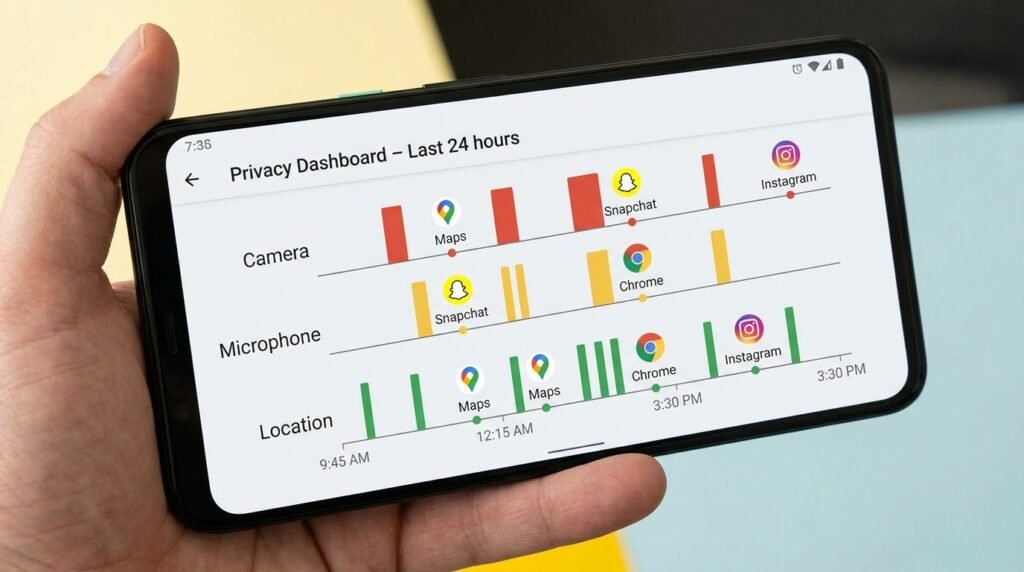
Understanding Android App Permissions: How to Manage Privacy in 2026
Android app permissions govern how applications on your smartphone access sensitive hardware features and private user data, including your precise location, camera, microphone, contacts, call logs, and internal file storage. As Android 16 and modern privacy frameworks introduce granular runtime permission controls, understanding how to audit, restrict, and manage these permissions is essential for protecting your digital privacy and preventing background data harvesting in 2026.
This guide covers both quick answers and in-depth explanations of Android app permissions.
1. Understanding Android Permission Categories
Android categorizes permissions into three primary risk tiers to balance app functionality with user privacy:
- Normal Permissions: Automatically granted by the system because they present minimal risk to privacy (e.g., internet access, vibration control, setting alarms).
- Dangerous / Runtime Permissions: Require explicit user consent via runtime pop-ups because they access personal data or physical hardware (e.g., Camera, Location, Microphone, Contacts, Body Sensors).
- Special App Access Permissions: High-privilege controls managed through system settings that allow apps to overlay on screen, access all files, read notification content, or modify system settings.
2. Critical Permissions to Audit for Security
While many utility and messaging apps require hardware permissions to operate, malicious or over-privileged applications frequently request broad access that exceeds their operational scope. Review these key permission types:
A. Location Services (Precise vs. Approximate)
Android allows users to choose between Precise Location (GPS-accurate pin-pointing) and Approximate Location (cell-tower and Wi-Fi triangulation). Navigation apps like Google Maps require precise location, whereas weather widgets and localized news apps operate effectively with approximate location. Always set non-navigation apps to “Allow only while using the app” with precise location disabled.
B. Microphone & Camera Access
Apps requesting background microphone or camera access pose significant privacy risks. Modern Android versions display visual privacy indicators (green dot in the top notification bar) whenever an active app accesses the camera or mic. Ensure that social media apps and recording tools only possess camera access while actively open on screen.
C. All Files Access & Media Permissions
Rather than granting unrestricted access to internal storage via legacy storage permissions, Android utilizes Photo Picker and Scoped Storage APIs. Photo Picker lets users select specific photos or videos without giving the app read access to your entire media gallery.
3. Step-by-Step Guide to Managing App Permissions
To perform a comprehensive permission audit on your Android smartphone:
- Open your smartphone’s Settings app and select Privacy & Security.
- Tap Permission Manager to view a category-by-category breakdown of granted permissions.
- Select sensitive hardware features (such as Microphone or Location) to see which apps have access.
- Change app status to “Ask Every Time” or “Don’t Allow” for non-essential applications.
- Enable “Auto-reset permissions” for unused apps so Android automatically revokes granted access if an app remains unopened for 90 days.
4. Advanced Privacy Safeguards in 2026
Beyond standard permission menus, Android power users can use advanced privacy dashboards, sensor mute toggles, and isolated profiles. Enabling quick setting tiles for Camera Access and Mic Access allows you to disable physical hardware sensors globally across the entire operating system with a single tap, providing complete physical privacy against unauthorized background recording.
2026 Industry Best Practices & Security Recommendations
Establishing digital hygiene routines safeguards your Android device against emerging mobile security vulnerabilities, zero-day exploit vectors, and silent battery drain. Incorporate these daily maintenance routines:
- Weekly Device Restarts: Rebooting your smartphone at least once per week flushes active RAM caches, closes orphaned background daemon threads, and re-initializes wireless modem drivers.
- Regular App Auditing: Periodically uninstall applications that have remained unused for over 30 days. Removing dormant applications eliminates background data sync requests and frees internal UFS storage capacity.
- Verify Official Software Downloads: Only download software packages and mobile applications from verified repositories such as the Google Play Store, Samsung Galaxy Store, or trusted developer portals.
Conclusion & Final Thoughts
By implementing these technical recommendations and maintaining proactive device management, Android power users can maximize hardware longevity, protect private user data, and enjoy uncompromised mobile performance across all operational scenarios in 2026.
